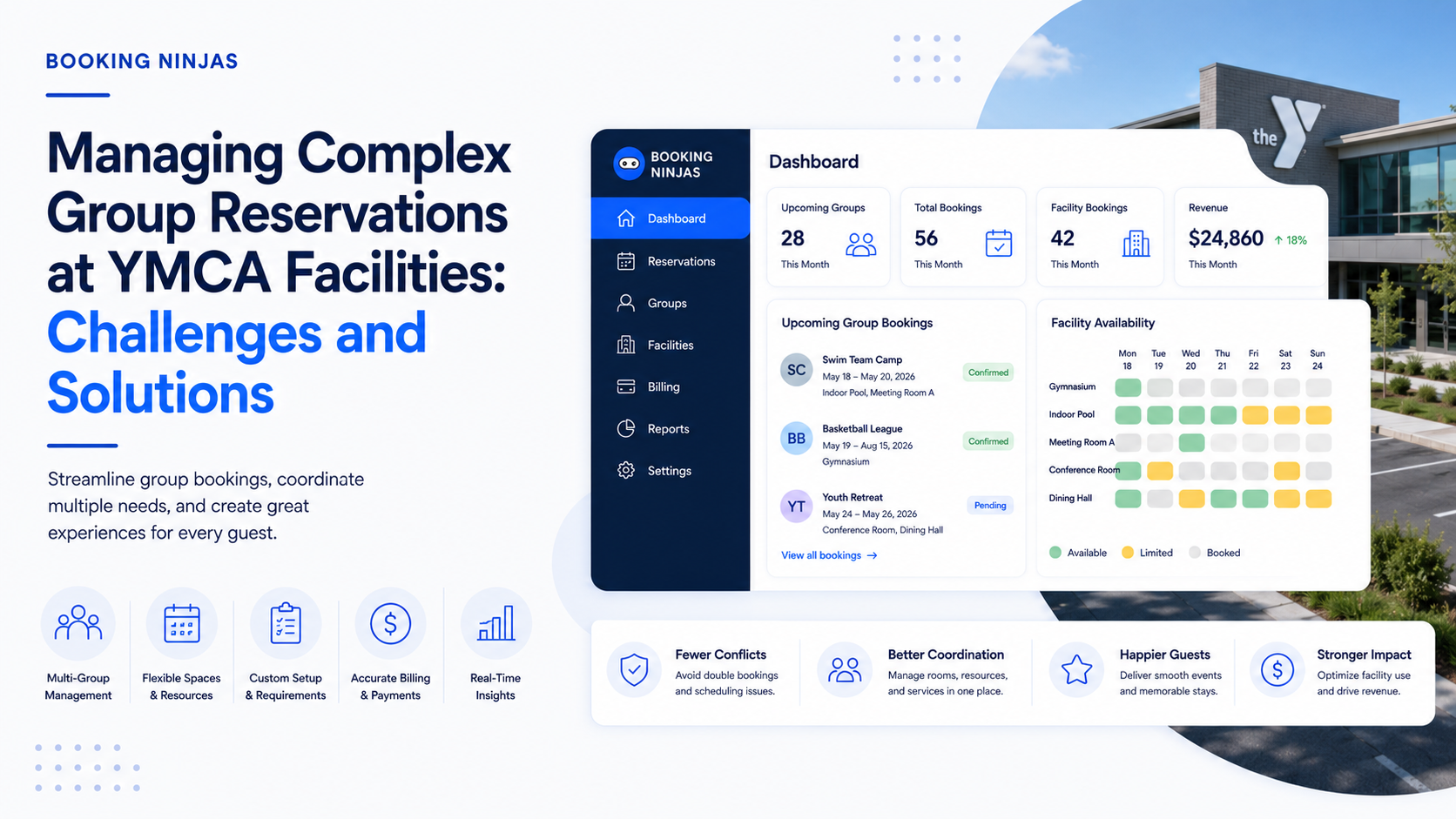
A YMCA group reservation can involve far more than holding a room. One group may need cabins, meeting spaces, activities, multiple participants, a primary organizer, a separate billing organization, deposits, add-ons, arrival information, and changes before the group reaches the facility.
That is especially important for organizations operating camps, lodges, outdoor centers, recreation facilities, programs, and community spaces under the same broader YMCA organization.
Why are YMCA group reservations more complex than ordinary bookings?
An individual cabin reservation may involve one customer, one lodging space, one stay period, and one payment relationship.
Group business adds additional relationships.
- One organizer representing many participants
- Multiple lodging spaces or room units
- Shared meeting and activity spaces
- Multi-day schedules
- Group-level and individual information
- Different booked-by and billed-to contacts
- Deposits and scheduled payments
- Add-ons, services, and special requirements
- Participant-count changes
- Cross-department operational work
Booking Ninjas' Group Booking capability is designed around multi-person, multi-space, multi-resource, and multi-day reservation scenarios rather than treating a group as one oversized individual booking.
What should a YMCA group reservation connect?
The school, nonprofit, household, organization, retreat group, or other shared relationship.
The dates, property, lodging, spaces, status, participants, add-ons, and booking details.
The billed-to party, invoice, deposit, balance, payment schedule, and payment activity.
The facility, staff, communication, readiness, service, and reporting work required to deliver the stay or event.
What is the difference between the group and the reservation?
This distinction becomes important once the same school, organization, family group, or community partner returns more than once.
| Record | What it represents | Example information |
|---|---|---|
| Group or organization | The ongoing relationship with the organization or group. | Group name, organization type, primary contact, billing information, related people, booking history. |
| Contact | An individual person involved in the relationship. | Organizer, participant, parent, guest, billing contact, or other individual. |
| Reservation | A specific booking commitment. | Property, dates, lodging spaces, room units, guests, add-ons, status, rate, notes. |
| Invoice or payment | The financial activity associated with the booking. | Billed-to party, deposit, amount due, payment, balance, refund, or payment status. |
This structure also allows one organization to have multiple contacts or multiple reservations without recreating the entire relationship every time.
What does the YMCA of the North story show about reservation complexity?
Seasonal reservations exposed the need for connected booking rules
YMCA of the North operates camps and outdoor centers in Minnesota. Its cabin-rental operation needed to account for seasonal availability around program schedules while also managing guest data and a staged payment process.
The previous reservation tool operated separately from Salesforce, which meant staff had to manage parts of the reservation and payment process across disconnected systems.
Booking Ninjas implemented a Salesforce-native booking environment in which reservation data, guest records, availability rules, and payments could remain connected.
Read the YMCA of the North customer story →That customer story focuses primarily on cabin reservations rather than large group events, but the underlying lesson carries directly into group management: the more rules, people, dates, spaces, and financial relationships a booking contains, the more important the connections between those records become.
How should a YMCA check availability for a group?
Group availability is not simply a question of whether one cabin or meeting room is open.
The facility may need to determine whether the required combination of resources is available across the entire group period.
- Cabins or lodging units
- Room types
- Meeting rooms
- Activity spaces
- Shared facilities
- Program periods
- Capacity limits
- Operational restrictions
Booking Ninjas' Availability Management maintains the availability context behind reservations, while Group Booking can coordinate bookings that involve multiple people, spaces, resources, or schedules.
Why are multi-day YMCA bookings difficult to coordinate?
A group staying several days may use different resources at different times.
Lodging might cover the full stay, while meeting rooms, dining spaces, activities, and other resources follow their own schedules.
| Group requirement | Reservation question | Operational relationship |
|---|---|---|
| Lodging | Which rooms or cabins are committed for each night? | Availability, room assignment, occupancy, turnover. |
| Meeting space | Which room is required and during which time block? | Resource schedule, setup, capacity. |
| Activities | Which participants attend which session? | Program schedule, capacity, staff, equipment. |
| Additional services | Which extras belong to the group or specific reservation? | Add-ons, charges, fulfillment, reporting. |
Group Booking supports multi-day and recurring booking structures, allowing the wider group relationship to remain intact while individual parts of the schedule are managed separately.
Why should booked-by and billed-to relationships remain separate?
The person coordinating a group is not necessarily the person or organization financially responsible for it.
For example, a staff member from a school may arrange the stay while the school itself is responsible for the invoice. A parent may organize a family group while another person handles payment.
A YMCA reservation model should therefore preserve:
- Group or organization
- Primary contact
- Booked-by person
- Billed-to person or organization
- Participants or guests
- Related reservations
This becomes particularly important when staff need to answer questions about who requested a change, who should receive communication, and who is responsible for the remaining balance.
How should YMCA group deposits and payments connect to the reservation?
Complex bookings frequently create financial activity before the group arrives.
Depending on the YMCA's policies, this may include deposits, installments, partial payments, final balances, additional charges, refunds, discounts, or other arrangements.
The important requirement is that payment activity remains connected with the correct group, reservation, invoice, and responsible account.
The YMCA of the North customer story gives a practical example. Its cabin-rental process required 50% at booking when arrival was more than 30 days away, with the remaining balance due later. The implemented reservation workflow connected that payment logic directly with the booking lifecycle.
Booking Ninjas' Invoice Management provides the financial record layer around reservations, payments, balances, and billing relationships.
What happens when the group changes before arrival?
Group reservations rarely remain completely static.
The organizer may change participant counts, arrival dates, room requirements, services, activities, or billing arrangements.
The system needs to show what the change affects rather than simply overwriting the original plan.
| Change | Records to review | Possible operational effect |
|---|---|---|
| Group size increases | Capacity, lodging allocation, participants, pricing. | Additional rooms, resources, or services may be required. |
| Group size decreases | Room allocation, charges, invoice, cancellation rules. | Inventory may become available again. |
| Dates change | Availability, rates, lodging, activities, payment timing. | Previously available resources may no longer be available. |
| Organizer changes | Group record, contact, communication responsibility. | Future communication should reach the correct person. |
| Billing responsibility changes | Account, invoice, payment, billed-to relationship. | Financial follow-up needs to move to the correct party. |
Why should the reservation connect to facility operations?
Confirming the booking is only the beginning of the YMCA's work.
The reservation may create operational requirements across lodging, facilities, programs, finance, guest services, and other teams.
- Room or cabin preparation
- Facility setup
- Activity scheduling
- Staff assignments
- Service or equipment requests
- Maintenance preparation
- Billing follow-up
- Arrival communication
When these workflows are disconnected from the reservation, departments can end up working from different versions of the same group plan.
Which parts of a YMCA group booking should be self-service?
Not every group reservation needs the same booking experience.
A straightforward cabin rental may be suitable for a largely self-service booking path, while a large school, retreat, or multi-resource group may require more staff involvement before the reservation is confirmed.
A useful approach is to separate simple customer actions from decisions that require YMCA review.
| Could be customer-facing | May require staff control |
|---|---|
| View eligible availability | Approve unusual or complex space requirements |
| Review reservation information | Negotiate group-specific terms |
| Make permitted payments | Approve exceptions or discounts |
| Submit allowed updates or requests | Reallocate limited rooms or shared resources |
Booking Ninjas' Guest Portal supports guest-facing access to reservations, payments, and service activity, while the exact actions available to organizers can be controlled by the implemented workflow.
What can other YMCAs learn from YMCA of the North?
The most useful lesson is not that every YMCA should copy the same booking rules.
YMCA of the North had a particular operating problem: seasonal cabin inventory, Salesforce data in one environment, reservations in another, and a payment schedule that required staff follow-up.
The solution was configured around those relationships instead of forcing the organization into a generic reservation process.
A YMCA managing school groups, retreats, family camps, conferences, or other complex reservations may have different rules, but the same design principle applies:
What should YMCA teams be able to see about group reservations?
Management reporting becomes more useful when it can answer both reservation and operational questions.
- Upcoming groups
- Pending and confirmed reservations
- Group size
- Property or camp
- Lodging and space allocation
- Arrival and departure dates
- Deposit or payment status
- Outstanding balances
- Availability affected by group bookings
- Group and organization booking history
Because Booking Ninjas runs on Salesforce, these relationships can also contribute to the wider reporting environment across bookings, people, facilities, billing, and operations.
How should a YMCA design a group reservation workflow?
- Define the group types. Identify the meaningful differences between school groups, retreats, family groups, events, camps, rentals, and other reservation models.
- Map the people and organizations. Define the group, organizer, participants, primary contact, booked-by person, and billed-to party.
- Map the reservable resources. Define cabins, rooms, meeting spaces, programs, activities, and other resources that can be part of a group booking.
- Define availability and capacity rules. Establish what makes each resource available and which group-size, date, seasonal, or operational restrictions apply.
- Define the financial workflow. Map rates, deposits, invoices, installments, adjustments, discounts, refunds, and payment responsibility.
- Connect operational work. Determine what should happen after confirmation across facilities, staff, service, maintenance, communication, and reporting.
- Define the exception path. Decide what happens when the group changes size, dates, spaces, payment arrangements, or requirements.
How does Booking Ninjas support YMCA group reservations?
Booking Ninjas is a Salesforce-native platform for bookings and operations . Its YMCA environment can connect members, households, organizations, programs, facilities, reservations, payments, and operational workflows on the broader Salesforce platform.
For complex group reservations, that means the group relationship can remain connected to the people, spaces, schedules, billing, and operational records required to deliver the booking.
Connect YMCA memberships, programs, facilities, people, scheduling, and operations within one Salesforce-native environment.
Explore YMCA Management →Manage multi-person, multi-resource, multi-day, and recurring group reservations with connected availability and schedules.
Explore Group Booking →Connect reservation records with dates, customers, spaces, status, pricing, and related booking activity.
Explore Reservation Management →Coordinate the availability of lodging, rooms, and other reservable resources around dates and booking rules.
Explore Availability Management →Keep invoices, balances, payment activity, and billing relationships connected with the appropriate reservation or account.
Explore Invoice Management →See how a real YMCA operation connected seasonal cabin reservations, availability rules, Salesforce data, and staged payments.
Read the Customer Story →Frequently asked questions
What makes YMCA group reservations complex?
YMCA group reservations can involve multiple participants, lodging spaces, shared facilities, dates, activities, contacts, billing relationships, deposits, payments, add-ons, and operational requirements. The complexity increases when those elements change before arrival.
Is a YMCA group record the same as a reservation?
No. A group or organization record represents the broader relationship between related people and the organization. A reservation represents a specific booking. One group can therefore be connected to multiple reservations over time.
Can one YMCA group booking include multiple rooms or resources?
Yes. Booking Ninjas Group Booking supports reservations involving multiple people, rooms, resources, schedules, and multi-day booking structures. The exact configuration depends on the YMCA's facilities and booking model.
Can the person booking a YMCA group be different from the person paying?
Yes. A reservation can distinguish the booked-by relationship from the billed-to person, company, organization, or group. This keeps booking communication and financial responsibility connected without assuming they belong to the same person.
Can YMCA group reservations use deposits or partial payments?
Yes, where the configured billing workflow supports them. Booking Ninjas can connect reservations with invoices, deposits, partial payments, balances, refunds, and related payment activity. The exact schedule depends on the YMCA's financial policies and implementation.
Should every YMCA group booking be self-service?
No. Simple reservations may be suitable for a largely self-service process, while complex groups may require staff review for availability, pricing, resource allocation, billing, or special requirements. The appropriate balance depends on the booking model.
Does Booking Ninjas have experience with YMCA reservation operations?
Yes. YMCA of the North uses Booking Ninjas for a Salesforce-native reservation environment that connects seasonal cabin availability, guest data, booking rules, payments, and reporting. Booking Ninjas also provides a broader YMCA management solution for memberships, programs, facilities, scheduling, and operations.
Connect the whole group reservation
Bring organizers, participants, camps, lodging, spaces, availability, reservations, invoices, payments, and operational workflows into a Salesforce-native YMCA environment.