
Capacity Management on Salesforce
Set capacity limits for rooms, spaces, units, classes, or other bookable resources and keep those limits connected to availability and reservations.
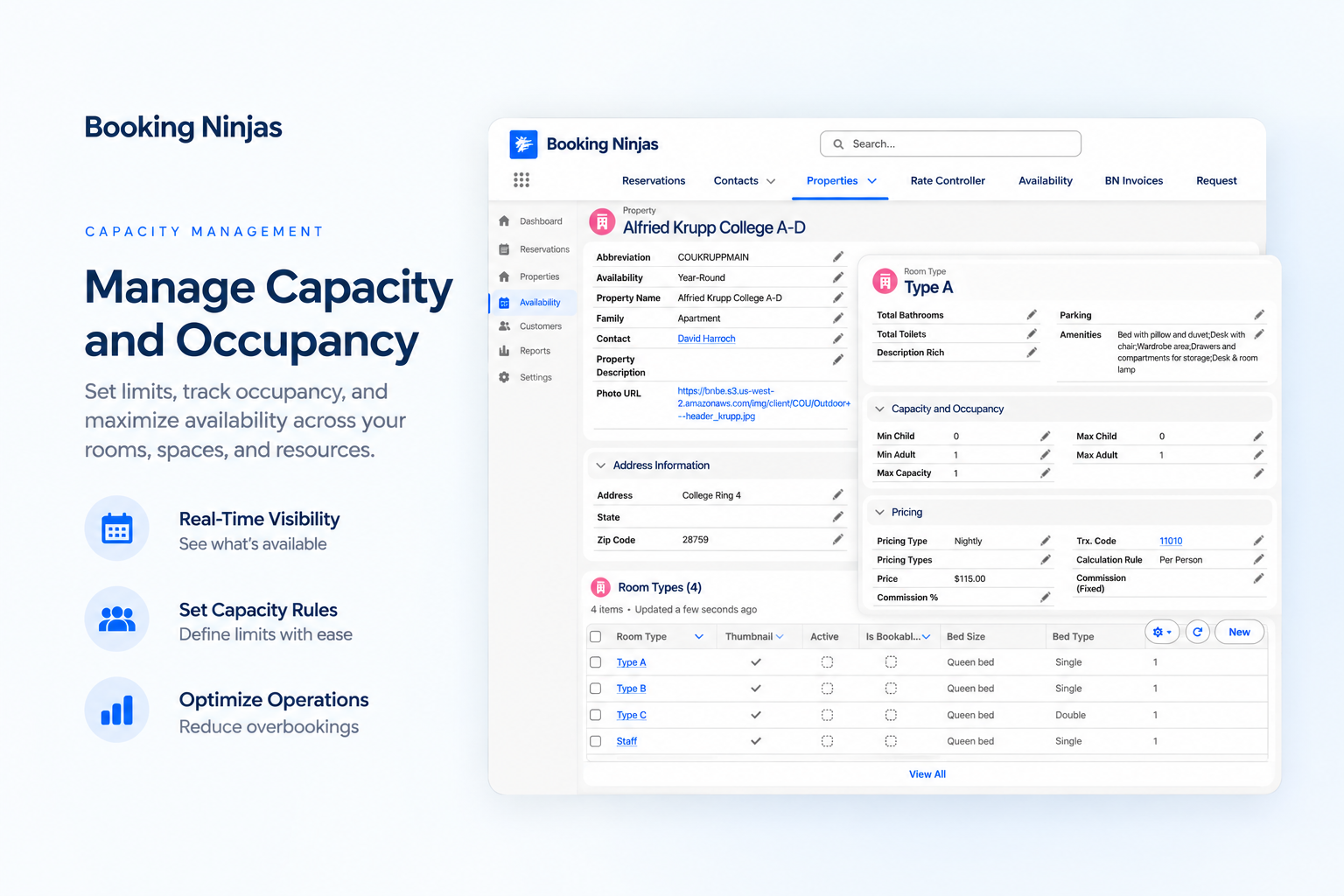
Capacity Is Part of Availability Management in Core
Core is Booking Engine + Reservation System for $400/month.
Core / Month
Capacity Management does not add a separate subscription charge.
Availability Foundation
Capacity rules help decide how much of a bookable resource is still available.
Connected Workflow
Use capacity with reservations, availability, group booking, rates, billing, and reporting.
Watch Capacity Management in Action
Show how limits are set, how availability reacts, and what staff see as bookings change.
Set Capacity
Show how staff define the quantity, occupancy, or capacity limit for a bookable resource.
See Remaining Availability
Show how the available amount changes according to bookings and configured rules.
Handle Booking Changes
Show what happens to capacity when a reservation is created, changed, or canceled.

Verified in the Salesforce Ecosystem.
Booking Ninjas is publicly listed on Salesforce AppExchange, giving buyers an external place to review the product and its public pricing reference.
Keep Capacity Connected to What Can Be Booked
Capacity matters most when it is part of the same workflow as availability and reservations.

Capacity Limits
Define how much of a room, space, unit, class, or other resource can be booked.
Remaining Capacity
Give staff a clearer view of what remains available based on the configured reservation logic.
Shared Availability
Use the same capacity foundation that supports the availability shown to staff or customers.
Operational Visibility
Use reporting and dashboards to review how capacity is being used in the configured operation.
Set Capacity Rules for the Booking Workflow
Use rules to control how much can be booked and when exceptions are allowed.
Maximum Capacity
Define the maximum quantity or occupancy the resource should accept.
Time-Based Limits
Apply capacity conditions to selected dates, times, or scheduling periods where required.
Resource-Level Rules
Use different limits for different rooms, spaces, units, classes, or other configured resources.
Controlled Overrides
Allow authorized staff to make exceptions when the configured workflow permits them.
Let Capacity Move With the Reservation
Keep capacity changes tied to the reservation workflow instead of recalculating separate spreadsheets.
New Booking
A booking can reduce remaining capacity according to the configured availability and reservation rules.
Reservation Change
Date, quantity, resource, or participant changes can feed back into capacity where the workflow is configured that way.
Cancellation
Released capacity can become available again when the cancellation workflow allows it.
Manual Adjustment
Authorized staff can make controlled adjustments when operational circumstances require them.
Give Teams a Clearer Capacity View
Use the reporting and operational views configured for your Booking Ninjas setup.
- Capacity and availability views
- Utilization reporting
- Threshold or rule monitoring where configured
- Multi-resource or multi-location reporting
- Salesforce dashboards based on the data captured in the implementation
Keep Exceptions Controlled
Capacity rules need flexibility, but that flexibility should stay visible to the team.
- Permission-based overrides where configured
- Reservation history connected to the underlying booking record
- Salesforce-based user permissions and access controls
- Reporting on the capacity and reservation data captured by the system
- Final audit and approval behavior depends on implementation scope
Where Capacity Management Fits
Use it when a booking consumes a limited room, space, seat, unit, slot, or other bookable resource.


Retreat Centers
Coordinate accommodation, program, and shared-space capacity across group stays.
Learn More
Conference Centers
Keep room, setup, and attendee capacity connected to the booking workflow.
Learn More
Classes & Services
Use capacity limits for appointments, classes, services, or other scheduled offerings.
Learn MoreCapacity Management Pricing
Capacity Management is included through Availability Management in the $400/month Core Package.
Core Package
Booking Engine + Reservation System
Per Month
Core pricing for the Booking Engine + Reservation System.
Capacity Management
No separate Capacity Management subscription is added on top of Core.
Implementation
One-time implementation is discussed based on scope.
Implementation depends on resource structure, capacity rules, availability logic, data, integrations, testing, training, and rollout. Advanced external inputs, premium AI, new integrations, or custom logic can be separate where required. Learn why implementation is discussed before a final price .
Capacity Management: Booking Ninjas vs Other Approaches
Compare manual capacity tracking with a capacity workflow connected to reservations and Salesforce.
| Capability | Manual / Spreadsheet | Booking Ninjas | Standalone Tool |
|---|---|---|---|
| Capacity limits | Manual tracking | Configured in Core workflow | Usually supported |
| Availability context | Separate checks | Connected to Availability | Requires integration |
| Reservation changes | Manual recalculation | Can update capacity workflow | Depends on product |
| Group bookings | Manual coordination | Group Booking included in Core | Depends on product |
| Reporting | Manual consolidation | Core reports & dashboards | Product-specific |
| Salesforce context | No native connection | Salesforce-native | Requires integration |
| Separate feature fee | Not applicable | No — included in Core | Vendor pricing varies |
| Best fit | Very simple capacity needs | Capacity + booking operations | Standalone capacity workflow |
Frequently Asked Questions
Keep Capacity Connected to Every Booking
Use Core to connect capacity, availability, reservations, group bookings, rules, and reporting in one Salesforce-native workflow.