
Kitchen Display System for Faster Order Handoffs
Move kitchen orders from the front of house to the kitchen display with a clearer, shared workflow for preparation, status updates, and staff handoff.
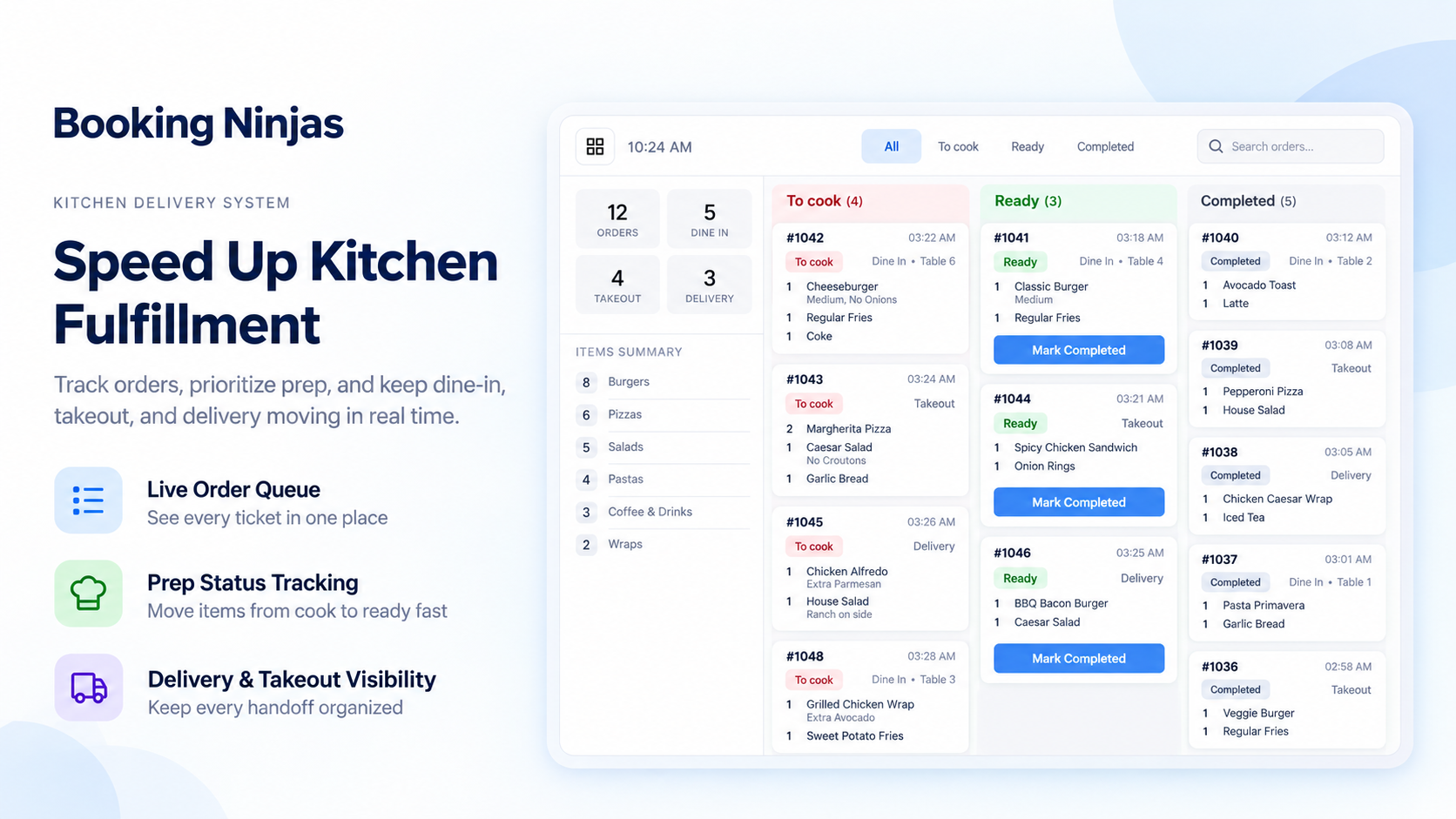
KDS App Is +$100/Month per Location
A kitchen-facing order display layer for Booking Ninjas operations.
Per Location / Month
KDS App pricing is based on each operating location using the kitchen display workflow.
POS Extension
Add POS when Booking Ninjas is also used for point-of-sale order entry and sales workflows.
BN Minimum Subscription
The Booking Ninjas minimum subscription remains $400/month.
Watch the Kitchen Workflow in Action
Show how an order reaches the kitchen, moves through preparation, and is handed back to staff.
Receive the Order
Show a new order entering the kitchen queue from the configured order workflow.
Update Preparation Status
Show kitchen staff moving items through the preparation states configured for the operation.
Complete the Handoff
Show the completed order status and the staff workflow used to move it to pickup, service, or delivery.

Verified in the Salesforce Ecosystem.
Booking Ninjas is publicly listed on Salesforce AppExchange, giving buyers an external place to review the product and its public pricing reference.
Give the Kitchen a Clear Order Queue
Keep incoming orders visible in one place so kitchen staff can see what needs attention next.
Incoming Orders
Display orders that enter the configured kitchen workflow.
Order Details
Keep relevant item, quantity, modifier, note, or other order details visible where configured.
Preparation Status
Use the status steps configured for the kitchen to show what is new, in progress, or complete.
Staff Visibility
Help the kitchen and service team work from the same order context instead of separate notes or tickets.
Move Orders Through the Kitchen Workflow
Use status changes to show where an order or item sits in the preparation process.

New
Show newly received kitchen orders or items that have not yet entered preparation.

In Preparation
Let kitchen staff mark the order or item as being prepared using the status workflow configured for the operation.
Ready
Mark the order or item ready so the next staff handoff can happen from the same shared status.
KDS and POS Work Together, but They Are Separate Extensions
POS handles sales and order entry. KDS provides the kitchen-facing display and preparation workflow.
POS Extension
Use POS for product selection, orders, sales, discounts, refunds, transaction records, and other front-of-house point-of-sale workflows.
KDS App Extension
Use KDS for the kitchen-side order queue, item visibility, preparation status, and staff handoff configured for the location.
Keep the Software and Kitchen Hardware Scope Clear
KDS App covers the Booking Ninjas kitchen workflow. Physical devices and the network environment remain separate.
-
Displays & Tablets
Kitchen screens, tablets, mounts, stands, and replacement devices remain separate unless specifically included in a project scope.
-
Network Environment
Reliable device connectivity depends on the location's internet, local network, hardware, and operating environment.
-
Printers & Peripherals
Kitchen printers and other peripherals can remain part of the local hardware setup where required.
-
Implementation
Screen setup, order routing, statuses, staff roles, device testing, and rollout are discussed based on the location.
Where a Kitchen Display System Fits
Useful anywhere food or beverage orders need a clearer handoff from order entry to kitchen preparation.
Hotels & Resorts
Route configured food and beverage orders into a kitchen-facing workflow connected to the property operation.
Clubs & Member Venues
Keep member-facing food service orders connected to the kitchen workflow used by staff.
Retreat & Conference Centers
Support meal-service preparation where orders or meal requests need to reach the kitchen clearly.
Cafés & Food-Service Locations
Give the kitchen a digital queue and status workflow for orders created through the configured sales process.
KDS Adds the Kitchen Operations Layer
Other Booking Ninjas modules continue to own the sales, booking, membership, billing, or event workflow behind the order.
- Kitchen Order Display & Preparation Status — KDS App
- Point-of-Sale Orders & Sales — POS Extension
- Bookings, Availability, Invoicing & Billing — Core
- Member Records & Stored Value — Membership
- Event Workflows & BEO — Event Management
- External Self-Service — Portal Extension
- New Integrations or Client-Specific Kitchen Logic — Scoped Separately
Kitchen Display System Pricing
KDS App is +$100/month per location.
KDS App Extension
Kitchen order display, preparation status, and staff handoff
Per Location / Month
KDS App pricing for each operating location using the kitchen display workflow.
POS / Location / Month
Add POS separately when Booking Ninjas is also used for order entry and point-of-sale workflows.
Implementation
Order routing, kitchen statuses, devices, staff roles, testing, and rollout depend on scope.
Minimum Subscription
Booking Ninjas starts at $400/month. KDS App is added at +$100/month per location.
Separate When Needed
Kitchen displays, tablets, printers, peripherals, networking, additional modules, new integrations, and client-specific kitchen logic may be priced separately. Learn why →
KDS: Booking Ninjas vs Other Approaches
Compare paper tickets or disconnected kitchen tools with a kitchen display workflow connected to Booking Ninjas operations.
| Capability | Paper / Manual Tickets | Booking Ninjas | Standalone KDS |
|---|---|---|---|
| Kitchen order queue | Paper / verbal | KDS App workflow | Usually supported |
| Preparation status | Manual coordination | Configurable status workflow | Usually supported |
| Order context | Limited | Connected to BN records | Requires integration |
| POS relationship | Separate process | POS extension available | Depends on product |
| Salesforce context | No connection | Salesforce-native | Requires integration |
| Monthly KDS price | Staff / printing costs | +$100 per location | Vendor pricing varies |
| Best fit | Very light order volume | Kitchen + BN operations | Standalone kitchen display |
Frequently Asked Questions
Give the Kitchen a Clearer View of Every Order
Use KDS App to connect the kitchen order queue, preparation status, and staff handoff to the Booking Ninjas workflows behind the order.