
Campaigns, Email, SMS & WhatsApp in One Communication Hub
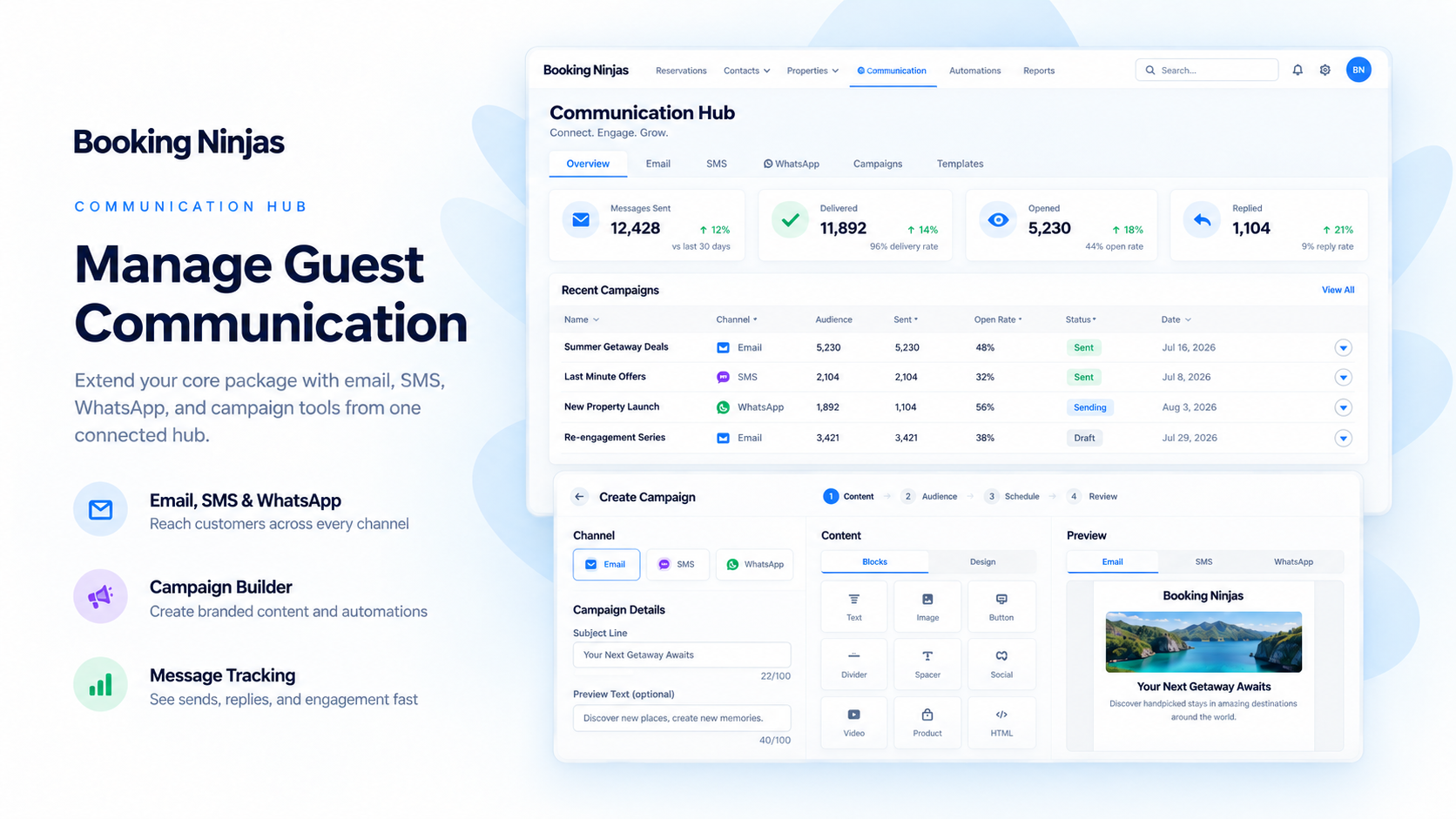
Build campaigns, define audience segments, personalise messages with dynamic variables, schedule sends, review communication logs, and manage Email, SMS, and WhatsApp from the same Salesforce-native environment as your customer and operational records.
Communication Hub Is a £100/Month Extension
Campaign building, audience segmentation, personalised content, scheduled communication, logs, and three messaging channels in one operational layer.
Per Organisation / Month
One Communication Hub extension for broader customer, guest, member, and operational communication.
Emails Included
Monthly email allowance for campaigns, follow-up, updates, and other configured communication.
SMS Included
Monthly SMS allowance for configured campaign and messaging workflows.
WhatsApp Included
Monthly WhatsApp allowance for configured Twilio-connected conversation workflows.
Watch the Communication Hub in Action
Show the full workflow from campaign setup and audience selection to personalised content, scheduled delivery, WhatsApp conversations, and communication logs.
Build a Campaign
Show campaign setup, audience segmentation, message content, dynamic variables, and scheduled sending inside Content Builder.
Segment & Personalise
Show how staff define an audience and use available customer or operational fields as dynamic variables inside the message.
WhatsApp & Communication History
Show inbound WhatsApp through Twilio, customer conversation context, and the logs staff can use for follow-up.
Build Campaigns With Content Builder
Communication Hub now goes beyond one-off messages. Content Builder supports campaign setup, audience segments, dynamic variables, scheduled sends, and communication logs.
Campaigns
Create structured campaigns instead of rebuilding the same communication process manually each time.
Audience Segments
Define campaign audiences using the customer and operational data available in your Booking Ninjas and Salesforce setup.
Dynamic Variables
Personalise content with available record fields such as customer names, booking details, membership information, property context, or other configured data.
Scheduled Sends
Schedule supported campaign communication for a future date and time instead of requiring staff to send every message manually.
Communication Logs
Keep campaign and message logs available so staff can review what was sent and continue follow-up with better context.
Content Drafting
Draft channel-appropriate content manually or use AI-assisted drafting where configured, with staff review before sending.
Move From Audience to Send in One Campaign Workflow
Content Builder keeps the core campaign steps close to the Salesforce records behind the communication.
1. Create the Campaign
Define the purpose and content of the communication inside the Communication Hub workflow.
2. Select the Segment
Choose the audience using the customer, booking, membership, property, event, or other suitable data available in the organisation.
3. Personalise the Content
Add dynamic variables from available records so one campaign can produce more relevant messages for different recipients.
4. Schedule the Send
Send immediately or schedule supported communication for a future date and time.
5. Review the Logs
Use campaign and communication logs to review send history and give staff context for later follow-up.

Available on Salesforce AppExchange.
Booking Ninjas is available on Salesforce AppExchange.
Draft Content From the Customer and Operational Context
Prepare communication without forcing staff to reconstruct the customer, booking, membership, billing, class, event, or request behind the message.
Draft From Context
Use the customer and operational records available in Booking Ninjas as context while preparing the message.
Adapt by Channel
Prepare a longer email, a concise SMS, or a conversational WhatsApp message for the channel being used.
Review Before Sending
Staff can review and adjust drafted or AI-assisted content before it is sent through the configured communication workflow.
Use the Channel That Fits the Message
Email, SMS, and WhatsApp each serve a different communication need while staying close to the customer and operational record.

Use email for campaigns, longer updates, follow-up, documents, announcements, and messages that need more context.

SMS
Use SMS for short, direct customer updates, campaign messages, reminders, and follow-up where SMS is the appropriate channel.
Receive inbound WhatsApp conversations through Twilio. Starting a new outbound WhatsApp conversation requires the appropriate Meta-approved template and sender setup.
Manage WhatsApp Conversations Through Twilio
WhatsApp supports conversational customer follow-up, but inbound and outbound initiation follow different provider rules.
Inbound Conversations
WhatsApp through Twilio can receive inbound customer conversations so staff can work from the customer and operational context available in Booking Ninjas.
Outbound Initiation
Starting a new outbound WhatsApp conversation requires a Meta-approved message template and the required sender and provider configuration.
Conversation Context
Keep relevant conversation history close to the customer and the Booking Ninjas records staff use for follow-up.
Provider Rules
WhatsApp availability, sender approval, templates, delivery, and destination rules depend on Twilio, Meta, recipient settings, and the provider configuration in use.
Communicate From the Context Staff Already Use
Keep the customer, booking, membership, billing, class, event, property, or request behind the conversation visible to staff.
-
Customer Context
Keep communication tied to the customer or contact record staff already use.
-
Operational Context
Reference bookings, memberships, properties, classes, events, invoices, requests, or other connected records when relevant.
-
Campaign Context
Use available Salesforce and Booking Ninjas data to define audience segments and personalise campaign content with dynamic variables.
-
Conversation & Send Logs
Keep relevant communication logs available so another staff member can understand previous messages and follow-up.
Keep Transactional Messages and Broader Communication Separate
Core handles basic operational communication. Communication Hub adds campaigns, segmentation, personalisation, scheduling, logs, and broader multichannel outreach.
Included With Core
Basic transactional communication such as booking confirmations and reservation reminders remains part of Core.
Communication Hub
Use Communication Hub for campaigns, audience segments, dynamic variables, scheduled sends, communication logs, broader Email, SMS and WhatsApp communication, conversation history, and AI-assisted drafting where configured.
Keep Campaign and Messaging Rules Under Control
Communication workflows should reflect sender setup, permissions, audience rules, customer preferences, and provider requirements.
Permissions
Control which staff can build campaigns, access communication history, and use configured communication workflows.
Sender Setup
Configure the email, SMS, and WhatsApp sender identities required by the provider.
Consent & Preferences
Use the consent, opt-out, and communication-preference process required for the business and jurisdiction.
Provider Rules
Delivery, sender approval, WhatsApp templates, and channel availability depend on the configured provider and destination.
Built for Communication-Heavy Operations
Communication Hub is useful when customer communication changes throughout the service journey and staff need the operational context behind each message.
Vacation Rentals
Coordinate pre-arrival communication, stay information, follow-up, guest conversations, and segmented outreach around booking and property context.
Hotels & Hospitality
Keep guest communication closer to reservations, billing, service requests, events, and other operational records.
Membership Businesses
Segment members and communicate around plans, renewals, classes, events, participation, or other membership context.
Service-Heavy Operations
Give staff a shared communication workflow when customer relationships involve repeated updates, requests, scheduling, and follow-up.
Communication Hub Adds the Campaign and Messaging Layer
The underlying Booking Ninjas modules continue to own the booking, membership, billing, class, event, or portal workflow behind the communication.
- Campaigns, Segments, Dynamic Variables, Scheduled Sends & Logs — Communication Hub
- Email, SMS & WhatsApp — Communication Hub
- AI-Assisted Message Drafting Where Configured — Communication Hub
- Inbound WhatsApp Through Twilio — Communication Hub
- Outbound WhatsApp Initiation — Meta-Approved Template Required
- Booking Confirmations & Reservation Reminders — Core
- Bookings, Availability, Invoicing & Billing — Core
- Member Records, Plans, Benefits & Stored Value — Membership
- Class Scheduling, Enrollment & Attendance — Class App
- Event Workflows & BEO — Event Management
- External Self-Service — Portal Extension
Communication Hub Is an Operational Campaign and Messaging Layer
Communication Hub supports campaigns, segments, dynamic variables, scheduled sends, logs, Email, SMS, WhatsApp, conversation history, and message drafting around Booking Ninjas operations. It is not positioned as a complete enterprise marketing automation suite with every possible journey orchestration, advertising, attribution, experimentation, or specialist marketing capability. Dedicated marketing platforms can remain in place where deeper functionality is required.
Communication Hub Pricing
£100/month per organisation with the same included monthly Email, SMS, and WhatsApp limits.
Communication Hub Extension
Campaigns, segments, dynamic variables, scheduled sends, logs, Email, SMS, WhatsApp, and message drafting.
Per Organisation / Month
One Communication Hub extension for the organisation.
Emails / Month
Included monthly email allowance.
SMS / Month
Included monthly SMS allowance.
WhatsApp / Month
Included monthly WhatsApp allowance.
When Core Is Also Required
Booking Ninjas Core starts from £400/month for 1–50 Active Bookable Units. When both Core and Communication Hub are required, the recurring software price starts from £500/month before implementation and separately required services.
Separate When Needed
Implementation, higher usage, Twilio or other provider costs, carrier fees, Meta-related requirements, new integrations, sender configuration, and client-specific communication logic can be priced separately. Annual billing saves 5% on Core and recurring add-ons. Regional pricing may vary. Learn why implementation is discussed separately →
Separate Messaging Tools vs a Connected Communication Hub
Compare a disconnected messaging process with campaigns and communication connected to Booking Ninjas operational context.
| Capability | Separate Tool / Manual Process | Connected Operational Setup |
|---|---|---|
| Campaigns | Campaign activity may be managed in a separate marketing or messaging tool. | Content Builder can organise campaign creation inside the Booking Ninjas communication workflow. |
| Audience Segments | Customer data may need to be exported or synchronised before segmentation. | Segments can use suitable customer and operational data available in the Salesforce environment. |
| Dynamic Variables | Personalisation depends on data imported into the messaging tool. | Available Booking Ninjas and Salesforce fields can be used as dynamic variables where configured. |
| Scheduled Sends | Scheduling happens in the external communication platform. | Content Builder can schedule supported sends from the communication workflow. |
| Communication Logs | Send and conversation history may be split across multiple tools. | Campaign and communication logs can remain closer to the customer and operational context. |
| Often handled in a separate campaign or inbox tool. | Communication Hub includes broader email communication with up to 5,000 emails per month. | |
| SMS | Often handled through a separate SMS provider or application. | Communication Hub includes up to 500 SMS messages per month. |
| Often managed in a separate provider inbox or messaging platform. | Twilio-connected inbound conversations are supported; outbound initiation requires Meta-approved templates. | |
| Transactional Booking Messages | May require another communication workflow. | Basic booking confirmations and reservation reminders remain in Core. |
| Operational Context | Staff may need to move between messaging and operating systems. | Communication can stay closer to Booking Ninjas customer, booking, membership, billing, class, event, and request records. |
| Specialist Marketing Depth | Dedicated marketing platforms may provide deeper journey orchestration, attribution, experimentation, and advertising capabilities. | Communication Hub focuses on campaigns and messaging connected to Booking Ninjas operational workflows. |
Frequently Asked Questions
Build Campaigns Without Losing the Customer Context
Use Communication Hub to segment audiences, personalise content, schedule campaigns, manage Email, SMS and WhatsApp, and keep communication logs close to the Booking Ninjas workflows your team already uses.