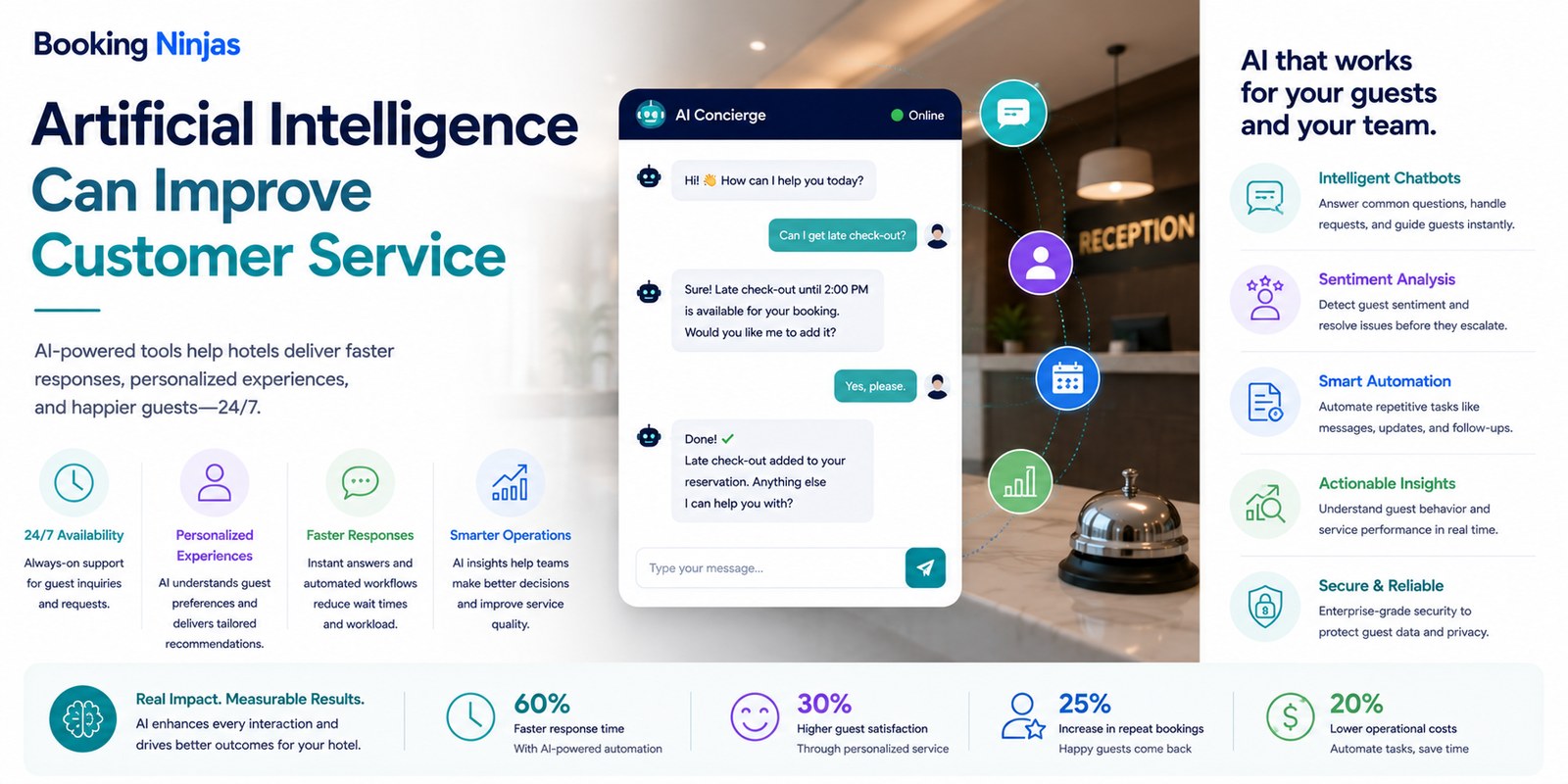
AI in customer service can help teams interpret conversations, classify requests, retrieve relevant information, suggest responses, prioritize work, identify patterns, and trigger configured workflows. Its value depends on how those capabilities connect with customer records, operational data, service processes, and human support.
AI should therefore be evaluated by the service workflow it supports, not by whether the organization can add a chatbot or generate an automated answer.
What is AI customer service?
AI customer service is the use of artificial intelligence to support customer-facing and service-management activities.
Depending on the system, data, and implementation, this can include:
- Understanding customer intent
- Classifying inquiries
- Summarizing conversations
- Retrieving relevant information
- Suggesting responses
- Prioritizing requests
- Identifying recurring issues
- Detecting unusual patterns
- Supporting self-service
- Triggering configured workflows
These capabilities are different from ordinary workflow automation. A predefined rule can route a request without AI. AI becomes useful when interpretation, classification, prediction, summarization, or pattern recognition is required.
Which types of AI matter for customer service?
Customer-service teams generally do not need to organize an implementation around theoretical categories such as artificial general intelligence or artificial superintelligence.
The more useful categories are based on what the technology needs to do inside the service workflow.
| AI capability | Customer-service use | Human consideration |
|---|---|---|
| Classification | Identify request category, subject, urgency signals, or intended workflow. | Incorrect classifications need a correction path. |
| Summarization | Condense a conversation, request history, or service record. | Important details should remain accessible for verification. |
| Generation | Draft answers, explanations, messages, or internal notes. | Generated content may need review before consequential use. |
| Retrieval | Find relevant policies, records, knowledge, or operational context. | Access should respect user permissions and data boundaries. |
| Prediction | Estimate conditions such as delay risk or possible service patterns. | Prediction is not certainty and should be interpreted in context. |
| Pattern detection | Identify recurring inquiries, bottlenecks, or unusual activity across service records. | Teams still need to investigate cause and appropriate action. |
How does AI fit into a customer-service workflow?
Interpret the interaction and connect it with relevant customer, account, booking, or operational context.
Classify, prioritize, retrieve information, or determine which configured service workflow applies.
Provide eligible self-service, generate an assisted response, or route the work to the appropriate person or team.
Preserve the interaction, action, outcome, and feedback for reporting and future analysis.
1. AI can help understand and classify incoming requests
Customer service begins with intake.
A customer may send a message about a reservation, payment, account, service request, maintenance issue, complaint, document, schedule, facility, or another part of the operation.
AI can support the intake stage by helping identify:
- Likely intent
- Request category
- Relevant customer or account context
- Possible priority
- Related previous interactions
- Information that may be missing
- Appropriate queue or department
- Possible next workflow
Booking Ninjas' Request Management provides structured intake, ownership, priority, status, escalation, notifications, and historical reporting. AI can support pattern recognition, prioritization, and request analysis around that structured workflow.
2. AI can support customer self-service
Some customer questions do not require a person to perform the first response.
Depending on the business and implementation, a conversational or portal-based experience may help customers:
- Find account information
- Locate relevant policies or instructions
- Understand booking information
- Submit a service request
- Check request status
- Retrieve eligible documents
- Identify the correct support path
- Complete configured self-service actions
Booking Ninjas' Chatbot Integration can connect conversational interactions with Salesforce records and operational workflows, including creating or routing requests where the configured use case allows.
For hospitality use cases, the Guest Portal can provide controlled self-service access to booking, billing, service, communication, and account information.
3. AI can assist customer-service employees
AI does not need to speak directly to the customer to be useful.
An employee-facing AI layer can support work such as:
- Summarizing a long interaction history
- Drafting a response
- Retrieving relevant records
- Finding policies or instructions
- Identifying similar previous cases
- Highlighting missing information
- Suggesting a next action
- Preparing internal notes
The employee can then review the available context before deciding what should actually be communicated or done.
This is particularly important for complaints, exceptions, contractual questions, payment disputes, unusual reservations, accessibility needs, safety issues, or other situations where the appropriate response depends on context.
4. AI can support prioritization and routing
Service teams often receive more than one type of request through more than one channel.
Routing can combine predictable rules with AI-supported interpretation.
For example, a workflow may consider:
- Request type
- Property or location
- Customer or account
- Priority
- Service-level target
- Department
- Required approval
- Current request status
Booking Ninjas Request Management can route requests by configured priority, role, department, approvals, notifications, and escalation. AI can add an interpretive layer where classification or pattern recognition is useful.
5. AI can support more relevant customer communication
Customer communication becomes more useful when it is connected with the operational event behind the message.
Examples include:
- Booking confirmations
- Reservation changes
- Payment-related updates
- Request-status updates
- Schedule changes
- Follow-up communication
- Service reminders
- Escalation notices
Booking Ninjas' Notification Management connects communication with workflow triggers, recipient controls, channels, escalation, follow-up, and communication history inside Salesforce.
AI can support activities such as summarization, message generation, prioritization, or communication-pattern analysis, while the workflow determines when communication should occur and who should receive it.
How should AI personalization use customer data?
Personalization does not mean collecting every possible detail about a customer or automatically using all stored information in every interaction.
Useful context can come from records such as:
- Current booking or service
- Account status
- Previous requests
- Communication preferences
- Property or location
- Configured service preferences
- Relevant transaction history
- Previous operational interactions
Which data is appropriate depends on the purpose of the interaction, user permissions, consent, organizational policy, privacy requirements, and the configured AI system.
Booking Ninjas' Data Privacy Management supports consent records, channel preferences, role-based access, privacy-request workflows, retention policies, and related governance inside Salesforce.
6. AI can help teams analyze customer-service history
Once requests and interactions are recorded consistently, AI can help teams examine patterns across the service history.
Analysis can support questions such as:
- Which request types occur repeatedly?
- Which issues tend to require escalation?
- Where do resolution delays occur?
- Which topics generate repeated follow-up?
- Which locations receive particular request types?
- Where is documentation unclear?
- Which workflows create avoidable handoffs?
- Which exceptions need process review?
The resulting pattern still needs interpretation. A high request volume does not automatically prove poor service, and a correlation between two records does not establish the cause.
Booking Ninjas' AI layer can support pattern detection, predictive analysis, summarization, and operational decision support across connected property data.
Does AI mean customer service can operate without staff 24/7?
No.
A chatbot, portal, automated workflow, or knowledge interface can be available outside staffed service hours, but availability is not the same as complete resolution.
Some interactions can be completed through self-service. Others may need to be captured, acknowledged, and queued for a person.
Human involvement becomes particularly important when the issue involves:
- Safety or emergencies
- Disputes
- Complex complaints
- Unusual financial decisions
- Policy exceptions
- Accessibility requirements
- Sensitive personal information
- Ambiguous or consequential decisions
When should AI hand the interaction to a person?
A customer-service design should define escalation before the AI is deployed.
Human review may be appropriate when:
- The customer requests a person
- The system cannot determine intent reliably
- Required information is missing
- The request falls outside configured scope
- A policy exception is requested
- A refund or dispute requires judgment
- The issue has safety or legal implications
- The customer challenges an automated decision
- The conversation is unusually sensitive
- The automated workflow repeatedly fails
The handoff should preserve the useful context already collected so the customer does not need to reconstruct the entire interaction for the employee.
Does AI automatically reduce customer-service costs?
No.
AI can reduce manual effort in particular workflows, but the financial outcome depends on the implementation and operating model.
Costs can also include:
- AI or model usage
- Software licensing
- Integration work
- Implementation
- Data preparation
- Testing
- Monitoring
- Governance
- Employee training
- Ongoing improvement
The useful measure is therefore not “AI is cheaper than people,” but whether a specific AI-supported workflow produces enough operational value to justify its total cost and risk.
Does AI automatically improve customer satisfaction?
No.
Customer experience can be affected by many factors, including the underlying service, response quality, speed, accuracy, accessibility, employee behavior, price, policy, product availability, previous interactions, and whether the problem was actually resolved.
AI can support parts of that experience, such as reducing unnecessary waiting for routine information or helping staff access relevant context faster.
But a fast automated answer that is irrelevant, inaccurate, or impossible to challenge can make the experience worse.
Does AI make customer service more secure?
AI by itself does not provide data security.
Security depends on the wider environment, including:
- Identity and authentication
- Role-based permissions
- Data access
- Integration security
- Encryption where appropriate
- Device and network security
- Audit history
- Monitoring
- Data governance
- Incident response
Adding an AI service can also create new questions about which information the service can access, what data is sent to external systems, how outputs are retained, and which users are permitted to invoke particular AI actions.
Why does the data foundation matter?
AI can only reason from the information and tools available to it.
Customer-service AI becomes more useful when the relevant context is structured and connected, such as:
- Customer or account
- Booking or agreement
- Property or location
- Invoices and eligible payment records
- Service requests
- Previous communication
- Documents and policies
- Operational status
- Permissions
- Historical outcomes
If that information is duplicated, stale, incorrectly permissioned, or disconnected from the workflow, adding AI does not automatically repair the underlying data problem.
How should an organization design AI-assisted customer service?
- Choose the service problem. Start with a specific customer interaction or employee workflow rather than the general objective to “add AI.”
- Map the current workflow. Document intake, information required, ownership, decisions, escalation, communication, and resolution.
- Identify the data. Determine which customer, account, booking, request, policy, or operational records are actually required.
- Separate rules from AI. Use predictable workflow automation where rules are sufficient and AI where interpretation or analysis adds value.
- Define permissions and privacy. Determine what information the AI can access and what it is permitted to do with it.
- Define human escalation. Specify the situations in which a person must review or take over.
- Test difficult cases. Evaluate ambiguity, unusual wording, incorrect information, disputes, sensitive requests, incomplete records, and failed integrations.
- Preserve service history. Record the request, AI-supported action, human action, resolution, and relevant outcome.
- Review performance. Examine where the workflow succeeds, fails, escalates, or produces unnecessary effort.
- Adjust deliberately. Update rules, prompts, permissions, knowledge, integrations, and escalation paths from observed evidence.
How does Booking Ninjas connect AI with customer service?
Booking Ninjas is a Salesforce-native platform for bookings and operations . Customer records, bookings, requests, workflows, portals, communication, reporting, permissions, automation, and integrations can therefore share the wider Salesforce platform foundation according to the configured implementation.
AI can sit on top of that operational context to support classification, summarization, pattern detection, prioritization, forecasting, recommendations, generated content, or other configured intelligence.
The objective is not to let AI control every customer interaction. It is to connect AI with the records and workflows required to make appropriate automation, assisted service, and human escalation possible.
Connect AI-supported analysis, prediction, automation, and operational intelligence with property workflows.
Explore Booking Ninjas AI →Connect AI capabilities with Salesforce property data and configured operational workflows.
Explore AI Integration →Capture, classify, assign, prioritize, escalate, and report on customer and operational requests.
Explore Request Management →Connect conversational interfaces with Salesforce records, requests, and operational workflows.
Explore Chatbot Integration →Trigger, route, track, and escalate customer and staff communications from operational events.
Explore Notification Management →Provide controlled self-service access to bookings, billing, communication, requests, and account information.
Explore Guest Portal →Structure consent, communication preferences, privacy requests, retention, and role-based access.
Explore Data Privacy →Connect AI-assisted decisions with assignments, approvals, routing, escalation, and exception handling.
Explore Workflow & Process →Frequently asked questions
What is AI customer service?
AI customer service uses artificial intelligence to support activities such as understanding customer intent, classifying requests, summarizing interactions, retrieving relevant information, suggesting responses, prioritizing work, identifying patterns, and triggering configured service workflows.
Is AI customer service the same as automation?
No. Automation can execute predictable rules and workflows without AI. AI can add interpretation, classification, generation, prediction, summarization, retrieval, or pattern detection where those capabilities are useful.
Can AI answer customer questions automatically?
AI can support automated answers and self-service for appropriate use cases when it has access to the required information and the interaction is within configured scope. Ambiguous, sensitive, disputed, unusual, or consequential issues may require human review.
Does AI replace customer-service employees?
No. AI can automate or assist parts of customer service, but people remain important for judgment, exceptions, complaints, disputes, accessibility needs, sensitive situations, complex requests, and interactions that benefit from human understanding.
Can AI provide 24/7 customer service?
AI-supported chatbots, portals, and automated workflows can remain available outside staffed service hours, but availability does not mean every issue can be resolved automatically. Some requests may need to be captured and escalated to a person.
Does AI automatically improve customer satisfaction?
No. AI can support faster access to information, self-service, routing, and employee assistance, but customer satisfaction also depends on response quality, accuracy, service delivery, policies, accessibility, human interactions, and whether the underlying issue is actually resolved.
Is customer data safe when AI is used?
Data security depends on the wider architecture rather than AI alone. Organizations need appropriate identity, permissions, integration security, privacy controls, governance, monitoring, and policies governing which information an AI service can access and how that information is handled.
How does Booking Ninjas use AI in customer-service workflows?
Booking Ninjas can connect AI-supported classification, summarization, pattern detection, prioritization, recommendations, and automation with Salesforce-based customer records, requests, portals, communication, workflows, reporting, and integrations according to the configured implementation.
Connect AI to the service workflow behind the conversation
See how Booking Ninjas can connect customer records, requests, portals, communication, AI, workflow automation, human escalation, and reporting within one Salesforce-native operating environment.